
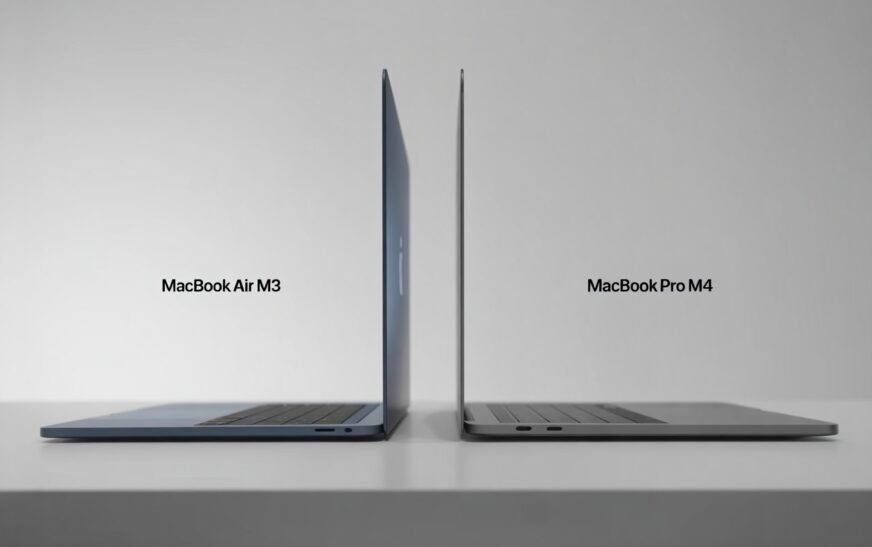
If you want the best everyday laptop for the money — light, fast, and fan-free — the MacBook Air M3 is hard to beat in 2026. If you regularly do video editing, 3D rendering, coding with heavy compiles, or run your Mac plugged in for hours at a stretch, the MacBook Pro M4 is worth the extra cost. For most people, the Air is genuinely enough.
Here’s the situation a lot of Mac buyers find themselves in right now: you’re ready to upgrade, you’ve narrowed it down to two machines, and the decision is harder than it should be. The MacBook Air M3 and MacBook Pro M4 are both excellent. Both run the same family of Apple silicon. Both have stunning displays. And unless you work in a specific field that demands pro-level sustained performance, both will handle your daily workload without breaking a sweat.
So what actually separates them? More than most people realize — and less than Apple’s marketing might suggest. This comparison cuts through the spec sheet and gets to what actually matters depending on how you work.
This article contains affiliate links. If you purchase through them, CrazyErrors may earn a small commission at no extra cost to you. Our recommendations are based on honest research and real-world experience — affiliate links never influence which products we suggest.
Watch: 8 Secret Mac Features I Wish I Knew Sooner!
MacBook Air M3 vs MacBook Pro M4: Specs at a Glance
Before we get into real-world differences, here’s a side-by-side look at the key specs:
| Specification | MacBook Air M3 | MacBook Pro M4 |
|---|---|---|
| Chip | Apple M3 | Apple M4 |
| CPU Cores | 8-core | 10-core |
| GPU Cores | 10-core | 10-core |
| Neural Engine | 16-core | 16-core (faster) |
| Base RAM | 8 GB (16 GB recommended) | 16 GB |
| Max RAM | 24 GB | 32 GB (base), 64 GB (Max) |
| Display | 13.6″ or 15.3″ Liquid Retina | 14.2″ Liquid Retina XDR (ProMotion) |
| Refresh Rate | 60 Hz | Up to 120 Hz ProMotion |
| Peak Brightness | 500 nits | 1,000 nits (1,600 HDR) |
| Cooling | Fanless (passive) | Active fan cooling |
| Battery Life | Up to 18 hours | Up to 24 hours |
| Ports | 2x USB-C (Thunderbolt 3) | 3x Thunderbolt 4 + HDMI + SD Card + MagSafe |
| Weight | 2.7 lbs (13″) / 3.3 lbs (15″) | 3.5 lbs |
| Starting Price (2026) | ~$1,099 | ~$1,599 |
Prices shift slightly with education discounts, refurbished options, and retailer deals. Always check Apple’s Education Store or certified refurbished section — you can save $100–$200 without sacrificing warranty coverage.
Performance: How Big Is the Gap Between M3 and M4?
Most Asked QuestionThe M4 chip is genuinely faster than the M3 — Apple’s benchmarks show roughly a 20–25% improvement in CPU performance and a notable jump in memory bandwidth. But there’s a crucial qualifier that most comparison articles gloss over: the M3 is already extremely fast.
For everyday tasks — browsing, email, writing, video calls, spreadsheets, light photo editing, streaming — the M3 Air is so fast that you will never notice a performance ceiling. The chip was already overkill for general productivity when it launched, and nothing has changed about that in 2026.
The M4 advantage becomes real and measurable in specific scenarios:
- Sustained workloads — The Pro’s active fan cooling lets the M4 run at full speed indefinitely. The Air’s fanless design means it thermal-throttles under sustained heavy load (video exports, long compiles, 3D renders). For a 10-minute task this rarely matters. For a 2-hour export, the Pro pulls noticeably ahead.
- Memory-intensive work — The Pro starts with 16 GB base RAM and scales to 32 GB or 64 GB with the M4 Pro/Max chips. For large Final Cut Pro timelines, machine learning workflows, or running multiple virtual machines, the higher ceiling makes a real difference.
- Video editing at 8K or heavy ProRes — The Pro has hardware ProRes acceleration and handles 4K/8K timelines with fewer dropped frames during playback.
- AI and on-device machine learning — The M4’s Neural Engine is faster, and with on-device AI becoming more central to macOS in 2025–2026, this gap is more relevant than it used to be.
If you’re looking at the base MacBook Air M3 with 8 GB of RAM, seriously consider upgrading to 16 GB at configuration time. macOS uses RAM efficiently through unified memory architecture, but 8 GB can feel tight if you run many browser tabs alongside creative apps. RAM cannot be upgraded after purchase — it’s soldered to the board.
Display: The Difference Is Bigger Than the Numbers Suggest
Worth KnowingBoth machines have beautiful screens. Sitting next to most Windows laptops, both would win easily. But put an Air and a Pro side by side and the differences are immediately visible to anyone who cares about display quality.
The MacBook Pro’s Liquid Retina XDR display offers:
- ProMotion (up to 120 Hz) — Scrolling, animations, and cursor movement feel noticeably smoother. Once you’ve used 120 Hz regularly, going back to 60 Hz on the Air feels like a step backward.
- Higher peak brightness — The Pro hits 1,000 nits (up to 1,600 nits in HDR), making it much more usable in bright outdoor environments or sunlit rooms. The Air tops out at 500 nits.
- XDR (Extreme Dynamic Range) — Deeper blacks, more accurate local dimming, and a wider contrast ratio that matters for photo and video work.
If your primary use is writing, coding, or general work in a typical office or home environment, the Air’s display is genuinely excellent. If you edit photos or video professionally, work outdoors frequently, or simply value a premium visual experience, the Pro’s display is worth the upgrade on its own.
Design and Portability: Air Wins Here, Clearly
Portability FirstThe MacBook Air has always been Apple’s “take it anywhere” laptop, and the M3 generation keeps that reputation intact. At 2.7 lbs for the 13-inch model, it barely registers in a bag. The wedge-free design is slim across its entire body, and the fanless architecture means it’s completely silent — no fan noise, ever, under any conditions.
The MacBook Pro M4 at 14 inches weighs 3.5 lbs — not heavy by any objective measure, but noticeably different when you’re commuting daily or traveling with it for weeks. The slight extra bulk is the cost of the fan system, the larger battery, and the expanded port selection.
On ports, the Pro wins decisively:
- Three Thunderbolt 4 ports vs the Air’s two Thunderbolt 3
- Full-size HDMI port (huge for presentations and external displays)
- SD card slot (invaluable for photographers)
- MagSafe charging port (leaves all three USB-C ports free while charging)
For users who regularly connect to external displays, card readers, or docking stations, the Pro’s port selection eliminates the need for a hub entirely. For the Air, a USB-C hub is almost a required accessory if you work at a desk.
Battery Life: Both Are Excellent, Pro Lasts Longer
All-Day PerformanceApple claims up to 18 hours for the MacBook Air M3 and up to 24 hours for the MacBook Pro M4. Real-world usage tells a somewhat different story — but both machines comfortably last a full workday on a single charge under mixed use.
In practice, expect:
- MacBook Air M3 — 10–14 hours of real-world mixed use (browsing, writing, light apps). Closer to 8–10 hours with video or heavier workloads.
- MacBook Pro M4 — 14–18 hours of real-world mixed use. Heavy workloads drain it faster, but the larger battery provides meaningful headroom.
The practical difference: the Air is a full-day machine. The Pro is a full-day machine with a buffer. Unless you’re regularly away from power for 12+ hours or doing intensive work on battery, both will serve you well. The Air’s lighter weight may matter more than the extra battery hours for most travellers.
The MacBook Pro charges via MagSafe or USB-C. The MacBook Air only charges via USB-C, meaning when it’s charging, one of your two ports is occupied. For desk users, this is where the Pro’s MagSafe becomes a genuine quality-of-life advantage.
Who Should Buy the MacBook Air M3?
✈️ MacBook Air M3 Is the Right Choice If You…
- Do most of your work in a browser, documents, spreadsheets, or communication apps
- Value portability and carry your laptop daily
- Work in quiet environments and appreciate a completely silent machine
- Are a student or working professional on a budget
- Do casual photo editing in Lightroom or Photos (not professional retouching)
- Occasionally edit videos under 30 minutes in iMovie or beginner Final Cut workflows
- Want Apple’s best value-per-dollar laptop in 2026
- Primarily work on battery without regular access to power
Who Should Buy the MacBook Pro M4?
💻 MacBook Pro M4 Is the Right Choice If You…
- Edit 4K or 8K video professionally or semi-professionally in Final Cut Pro or Premiere
- Work in 3D rendering, motion graphics, or complex compositing
- Run your Mac at full load for extended periods (hours of compiling, encoding, exporting)
- Need 32 GB RAM or more for large projects, VMs, or machine learning work
- Work as a developer running multiple services, Docker containers, or Xcode simulators simultaneously
- Regularly connect to external displays, SD cards, or docking setups without a hub
- Value the ProMotion 120 Hz display or frequently work in bright environments
- Work on a desk most of the time and price is secondary to long-term capability
The Honest Verdict: Which One Should You Actually Buy?
Bottom LineHere’s the uncomfortable truth that most comparison reviews avoid: the majority of people buying a MacBook Pro don’t need a MacBook Pro. They buy it because it feels like the “serious” choice, or because they think future-proofing requires the more expensive chip. In practice, the Air handles virtually everything an average professional does in a day — and does it beautifully, silently, and at a significantly lower price.
That said, the Pro isn’t overpriced if it fits your workflow. The display alone can justify the upgrade for creative professionals. The port selection is legitimately better. And if you regularly push sustained heavy workloads, the active cooling makes a real, measurable difference over months of use.
You want the best all-around laptop for everyday work
Students, writers, educators, remote workers, casual creatives, and most professionals will find the M3 Air handles everything they throw at it. Configure it with 16 GB RAM and you’re set for years. It’s lighter, cheaper, silent, and exceptionally capable.
Your work genuinely demands sustained performance
Video editors, developers with heavy build pipelines, 3D artists, and anyone regularly working at the machine’s limits will feel the difference. The Pro is also worth considering if you stay at a desk and want the superior display and port ecosystem.
ⓘ Affiliate link — we may earn a small commission at no extra cost to you. Price and availability may vary.
Real-World Use Case Breakdown
For Students
MacBook Air M3 — straightforwardly. Unless you’re in a film production, engineering simulation, or computer science program that involves heavy compiles and ML work, the Air handles every academic task comfortably. The lower price point also leaves room in the budget for storage, accessories, or software subscriptions.
For Remote Workers and Office Professionals
MacBook Air M3 again. Video calls, documents, spreadsheets, project management apps, browser tabs — the M3 handles all of this without ever pausing. The lighter weight is a real benefit if you move between locations.
For Photographers
Depends on your workflow. If you shoot RAW and edit in Lightroom Classic or Capture One with large catalogs, the Pro’s higher RAM ceiling and brighter display make a meaningful difference. Casual shooters editing JPEGs or lighter RAW files will do fine on the Air with 16 GB RAM.
For Video Editors
Hobbyists and YouTube creators working in 1080p or basic 4K: MacBook Air M3 is sufficient. Professional editors working with multicam 4K timelines, ProRes footage, or 8K: MacBook Pro M4, no question. The sustained performance gap is real for long export jobs.
For Developers
This depends on what you’re building. Web developers, mobile app developers doing standard iOS work, and engineers working with typical codebases: Air M3 with 16 GB is plenty. Backend engineers running Kubernetes locally, ML engineers training models, or anyone with memory-hungry dev environments: Pro M4 with 32 GB.
For Music Producers
Logic Pro users running moderate project sizes — tens of tracks with standard plugins — will be fine on the Air. If you regularly max out track counts, run CPU-intensive software synths, or use sample libraries that load dozens of gigabytes into RAM, the Pro’s headroom is worth it.
One Thing Worth Considering Before You Decide
The MacBook Air M3 and MacBook Pro M4 are not the only options. If you frequently do heavy creative work but the 14-inch form factor isn’t right for you, Apple also offers the MacBook Pro M4 in a 16-inch configuration — with an even larger display and bigger battery. And if budget is a real constraint, a refurbished or previous-generation MacBook Air M2 remains an excellent machine that handles everyday work without issue.
Also worth noting: RAM and storage are not upgradeable on any current Mac laptop after purchase. Choosing the right configuration upfront matters more on a Mac than it does on most Windows laptops. When in doubt, go one step up on RAM.
If you’re still unsure, visit an Apple Store and ask to use both machines side by side. Bring a task you actually do every day. The differences in display, keyboard feel, and build quality become much more concrete when you’re using them rather than reading about them.
MacBook Air M3 vs MacBook Pro M4 — Quick Decision Guide
- ✈️ Everyday work, studying, light creative tasks → MacBook Air M3
- 💻 Pro video editing, 3D rendering, sustained heavy loads → MacBook Pro M4
- 📸 Photography (professional, large RAW catalogs) → MacBook Pro M4
- 🎵 Music production (moderate projects) → MacBook Air M3
- 🔧 Developer (standard iOS/web work) → MacBook Air M3 with 16 GB
- 🔧 Developer (heavy ML, VMs, large builds) → MacBook Pro M4
- 💰 Budget-conscious buyer → MacBook Air M3 — best value in the lineup
- 📺 Best display experience → MacBook Pro M4 (ProMotion + XDR)
Frequently Asked Questions
Is the MacBook Air M3 still worth buying in 2026 when the M4 is out?
Yes, very much so. The M3 is not an old or outdated chip — it handles virtually all everyday tasks without any bottleneck. The price difference between the Air M3 and Pro M4 is significant (~$500), and for most users, that gap doesn’t translate into any meaningful performance difference in day-to-day work. The M3 Air remains one of the best laptop values on the market in 2026.
How much faster is the M4 compared to the M3?
In benchmark tests, the M4 shows roughly 20–25% better CPU performance and improved memory bandwidth compared to the M3. In real-world everyday tasks, this difference is rarely noticeable. It becomes meaningful during sustained heavy workloads — long video exports, large code compiles, 3D rendering — especially since the Pro’s active cooling lets the M4 run at full speed without throttling.
Should I get 8 GB or 16 GB RAM on the MacBook Air M3?
16 GB is strongly recommended for most users, and worth the upgrade cost at purchase time. While Apple’s unified memory architecture makes 8 GB more capable than it sounds, 16 GB provides noticeably more comfortable headroom when running multiple apps, many browser tabs, or any creative software alongside general productivity tools. RAM cannot be upgraded after purchase on any current Mac laptop.
Does the MacBook Air M3 overheat under heavy use?
The Air M3 is fanless, so it manages heat passively. Under sustained heavy loads — long video exports, extended gaming, continuous code compiles — it can thermal-throttle, meaning it slows itself down to manage temperature. For most users this is never an issue. For tasks that run at full CPU load for 30 minutes or more on a regular basis, the Pro’s active cooling is a genuine advantage.
Is the MacBook Pro M4’s display noticeably better than the Air?
Yes — more noticeably than the spec numbers suggest. The 120 Hz ProMotion refresh makes scrolling and animations feel significantly smoother once you’re used to it. The higher peak brightness (1,000 nits vs 500 nits) is a real difference in bright environments. And the XDR contrast and colour accuracy matters for anyone doing photo or video work. If display quality is important to you, the Pro’s screen is a meaningful upgrade.
Can the MacBook Air M3 handle video editing?
Yes, for most users. Editing 1080p video, basic 4K content, and YouTube-style projects in iMovie or beginner-to-intermediate Final Cut Pro workflows runs without issues on the M3 Air with 16 GB RAM. Where the Air starts to struggle is sustained 4K/8K ProRes editing with complex timelines, heavy effects, or projects that require long back-to-back exports — that’s where the Pro’s cooling and higher memory capacity provide a clear advantage.
Final Thoughts
Choosing between the MacBook Air M3 and MacBook Pro M4 isn’t really about which laptop is better — it’s about which one matches how you actually work. Apple has made both machines genuinely excellent, and either one will outperform the vast majority of tasks most people throw at a laptop in 2026.
If you’re reading this article and genuinely unsure whether you need the Pro, you probably don’t. The Air M3 is one of the best laptops available at any price, and it will serve most buyers well for years. Configure it with 16 GB of RAM, pick the storage that fits your needs, and use the money you saved on something else.
But if your work regularly demands the things the Pro does better — sustained performance, a sharper display, more RAM, a full port selection — don’t talk yourself out of it. It’s a machine that grows with your work rather than constraining it.
Either way, you’re getting one of the best laptops Apple has ever made. That part, at least, is easy.
If you’re still on the fence or your situation doesn’t fit neatly into either category, feel free to reach out to the CrazyErrors team — we’re happy to help you figure out which configuration makes the most sense for your specific setup.
ⓘ Disclaimer: This article is for informational purposes only. CrazyErrors is not affiliated with Apple Inc. or Microsoft Corporation. All specifications and pricing are based on publicly available information as of 2026 and may be subject to change. Always verify current pricing and specs at apple.com before purchasing.